Prepayment Invoice: A Complete Guide for US Businesses
A prepayment invoice is a formal billing document that requests payment from a buyer before goods are delivered or services are performed. It is not a receipt, not an informal deposit slip, and not a pro forma invoice. It is a legally binding document tied to a specific sales or purchase order, and it creates an immediate tax point, meaning sales tax or VAT obligations may arise the moment it is issued, not when the final invoice goes out.
That distinction matters in practice. A simple deposit request with no formal invoice attached does not trigger the same accounting obligations. A true prepayment invoice, by contrast, requires posting both the advance billing document and a final invoice to maintain a complete audit trail. Under US Generally Accepted Accounting Principles (GAAP), the prepaid amount must be recorded as a liability (unearned revenue on the seller’s books) until the goods or services are delivered.
Key characteristics of a prepayment invoice:
- Linked to a specific sales or purchase order, not issued as a standalone request
- Includes tax calculations where applicable, creating an immediate tax reporting obligation
- Generates an accounts receivable entry on the seller’s books and a prepaid expense on the buyer’s
- Requires a corresponding final invoice that reflects the total order value minus the advance already paid
- Must carry its own unique invoice number and documentation per standard accounting practices
Table of Contents
- When and why businesses use prepayment invoices
- How to create a prepayment invoice step by step
- Processing, applying, and adjusting prepayment invoices
- Why automated platforms handle prepayment invoices better
- Accounting entries and financial impact
- Invoicelabs makes prepayment invoicing faster and cleaner
- Key Takeaways
When and why businesses use prepayment invoices
Advance payment invoices are not reserved for large enterprises. Any business that takes on custom work, long-lead orders, or high-value contracts has good reason to use them.
The most common scenarios:
- Custom manufacturing or bespoke orders where materials must be purchased before production begins
- Large service contracts such as consulting engagements, software development, or construction projects
- New customer relationships where credit history is limited and the seller needs to reduce exposure
- Seasonal or high-demand goods where a deposit invoice secures inventory before it sells out
- International transactions where payment risk is elevated and upfront commitment is necessary
Beyond risk mitigation, billing in advance improves cash flow in a direct way. The seller receives funds before incurring the full cost of delivery, which reduces the working capital gap that kills many small businesses. For buyers, a formal advance payment invoice is also cleaner than an informal deposit: it documents the tax treatment, establishes the order reference, and gives both parties a paper trail if a dispute arises.
Pre-paid billing also helps with compliance. Prepayment invoices require posting to special ledger accounts rather than standard accounts payable or receivable, which keeps advance funds separate from earned revenue. That separation is not optional under GAAP. It is also worth reviewing your payment processing setup to confirm your systems can handle prepayment flows correctly before you start issuing them at scale.
How to create a prepayment invoice step by step
Getting the document right from the start prevents reconciliation headaches later. Here is the process, in order.

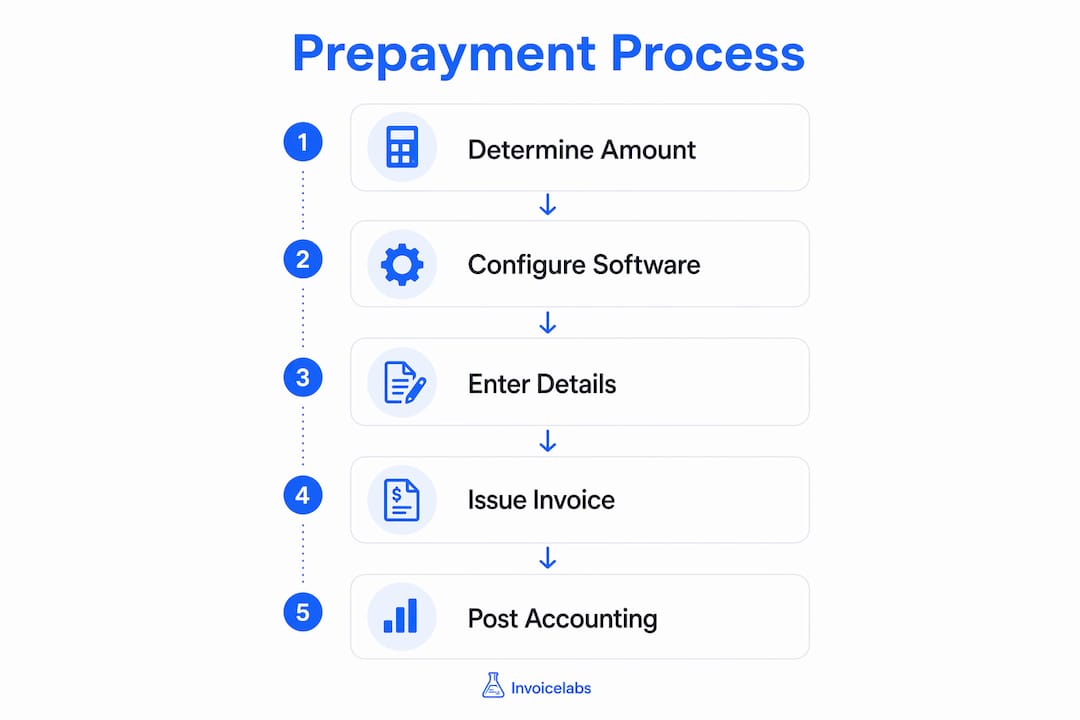
1. Determine the prepayment amount. Decide whether you are requesting a fixed dollar amount or a percentage of the total order value. Common practice for service businesses is to request a significant upfront deposit; manufacturers often require a higher portion. Tie this figure explicitly to the sales or purchase order so there is no ambiguity about what the payment covers.
2. Configure your accounting software. Most platforms require you to enable prepayment invoicing as a distinct feature before you can post one correctly. This typically involves setting up a dedicated prepayment ledger account, separate from your standard accounts receivable, and configuring a numbering sequence for prepayment documents. North American accounting software often restricts changes to prepayment percentages after an invoice is posted to prevent tax calculation errors, so get the setup right before you issue anything.
3. Enter the prepayment details. Reference the sales or purchase order number on the invoice. Include the prepayment amount, applicable tax rates, and a clear description of what the payment is for. The document should also state the expected delivery date or project milestone tied to the advance.
4. Assign a unique invoice number and issue the document. The prepayment invoice needs its own number, distinct from the final invoice that will follow. Send it to the customer with a clear due date and payment instructions.
5. Post the invoice in your accounting system. Once posted, the system should debit accounts receivable and credit the prepayment liability account. This keeps the advance funds off your revenue line until delivery is complete.
Pro Tip: Enable real-time tax calculation in your invoicing platform before you post a prepayment invoice. Tax errors on advance billing documents are harder to correct after posting because many systems lock the prepayment percentage to prevent downstream calculation mismatches.
Processing, applying, and adjusting prepayment invoices
Issuing the document is only the first step. What happens after the customer pays is where most accounting errors occur.

Receiving and validating the payment. When the customer’s payment arrives, match it against the specific prepayment invoice, not a general account. Systems that automate payment matching credit the prepayment correctly and update the outstanding balance in real time. Manual matching is where double-crediting and misapplied payments tend to happen.
Applying the prepayment to the final invoice. When you are ready to issue the final invoice, the total should reflect the full order value. The prepaid amount is then applied as a credit, reducing what the customer still owes. Proper linkage between the prepayment invoice and the sales order is what makes this application automatic rather than manual. Without it, you are hunting through transaction records to figure out what was already paid.
Handling adjustments and reversals. Orders change. If a customer reduces their order quantity after paying a deposit, you cannot simply edit the prepayment invoice. You need to issue a prepayment credit memo to reverse the original document, then reissue at the corrected amount. The same applies if an order is cancelled entirely. Skipping the credit memo and just adjusting the final invoice creates a balance discrepancy that will surface at month-end.
Avoiding double invoicing. This is the most common error in prepayment workflows. It happens when the prepayment invoice is not properly linked to the order, so the final invoice goes out for the full amount without deducting the advance. Linking prepayment invoices strictly to purchase or sales orders is the structural fix. The order record becomes the single source of truth for what has been billed and what remains outstanding.
Why automated platforms handle prepayment invoices better
Manual prepayment tracking works until it doesn’t. One missed credit memo, one misapplied payment, and you are spending hours untangling the books before a close.
Automated invoicing platforms address this at the process level, not just the document level. When a prepayment is received, the system updates the order balance immediately. When the final invoice is generated, the platform pulls the prepaid amount from the order record and applies it automatically. Automated settlement ensures the final invoice reflects the total transaction value minus prepayments, eliminating the reconciliation errors that manual tracking produces.
Real-time tax calculation is the other major advantage. A prepayment invoice creates a tax point the moment it is issued, which means the tax amount must be accurate at issuance, not corrected later. Platforms that calculate sales tax dynamically, based on the customer’s location and the product category, remove the guesswork from that step.
For month-end close, the difference is real. Finance teams using automated prepayment workflows spend less time on manual reconciliation and more time on analysis. Invoicelabs builds these capabilities into its core workflow: real-time tax calculations, instant payment status tracking, and automatic application of prepayments to final invoices, all without requiring a separate accounting module.
Accounting entries and financial impact
Every prepayment invoice generates a specific set of journal entries, and getting them right is non-negotiable for GAAP compliance.
When the prepayment invoice is issued:
- Debit: Accounts Receivable (the amount owed by the customer)
- Credit: Customer Prepayment Liability (unearned revenue account)
When payment is received:
- Debit: Cash or Bank
- Credit: Accounts Receivable
When the final invoice is issued and the prepayment is applied:
- Debit: Customer Prepayment Liability (reversing the advance)
- Credit: Revenue (recognizing earned income)
Tax entries run parallel to these. When a prepayment invoice is issued in a jurisdiction that taxes advance payments, the tax amount is recorded to a pending tax payable account. When the prepayment is applied to the final invoice, those tax entries are reversed and replaced by the tax on the full transaction. This two-step tax treatment is what US companies must manage through proper ledger account configuration and synchronous settlement settings.
Revenue recognition timing is the financial statement impact that matters most. Under GAAP, revenue cannot be recognized until performance obligations are met. A prepayment sits on the balance sheet as a liability until delivery occurs. Misclassifying it as revenue at receipt overstates income and creates a restatement risk.
Invoicelabs makes prepayment invoicing faster and cleaner
If you are managing prepayment invoices manually or through a general-purpose spreadsheet, the process is slower and more error-prone than it needs to be. Invoicelabs is built for exactly this kind of workflow: fast invoice creation, real-time tax calculations, and instant delivery so your customers receive a professional, accurate document the moment you send it.

The platform handles multi-currency billing, Stripe card payment integration, and full brand customization, so your advance payment invoices look as professional as your final ones. There are no hidden fees, and the free plan lets you get started without a subscription commitment. For freelancers, consultants, and small business operators who need to collect deposits before starting work, Invoicelabs removes the friction from the entire process.
Create your first prepayment invoice in under 30 seconds, or explore the full platform at Invoicelabs to see how it fits your invoicing workflow.
Key Takeaways
A prepayment invoice is a formal, order-linked billing document that creates an immediate tax point and must be paired with a final invoice to satisfy GAAP and US tax reporting requirements.
| Point | Details |
|---|---|
| Tax point at issuance | A prepayment invoice triggers sales tax or VAT reporting obligations immediately, not at final delivery. |
| GAAP liability treatment | Advance payments must be recorded as unearned revenue until goods or services are delivered. |
| Credit memo for reversals | Cancellations or order changes require a prepayment credit memo; editing the final invoice alone creates balance discrepancies. |
| Automation reduces errors | Automated platforms apply prepayments to final invoices in real time, preventing double invoicing and reconciliation mismatches. |
| Invoicelabs for fast issuance | Invoicelabs generates prepayment invoices with real-time tax calculations and Stripe payment integration in under 30 seconds. |
Recommended
Send your next invoice in seconds
Create professional invoices, track payments and get paid faster — free to start.


