Five Minute Agency Invoicing: UK Ready Templates and Automation

The fastest way to get agency invoices paid is to standardize a clear, itemized template and pair it with one-click payment links and automated reminders. Set that up first, before anything else. The rest of this guide covers the legal fields you can’t skip, the billing models that fit different engagements, and the automation that turns invoicing from a monthly headache into a five-minute task.
TL;DR:
- Using a single, clear invoice template with itemized details and embedded payment links significantly accelerates agency payment receipt.
- Including purchase order or contract references, clear descriptions matching the SOW, and separate pass-through costs prevent delays.
- Automating recurring invoices, reminders, and auto-populating line items from tracked time or expenses reduces manual work and errors.
- Consistently applying one billing model per engagement—retainer, milestone, or time-and-materials—avoids confusion and disputes.
- Addressing international client nuances, such as currency and VAT treatment, with clear terms speeds reconciliation and payment clearance.
Table of Contents
- What must an agency invoice include?
- Which billing model fits your agency’s work?
- What does a practical agency invoice template look like?
- Which automation and integrations actually save time?
- What workflow gets invoices approved and paid faster?
- What invoicing mistakes cause the most delays?
- How should agencies handle invoice disputes?
- What changes with international agency clients?
- How does VAT apply to agency invoices?
- How Invoicelabs applies these agency invoicing principles
- Getting your agency set up with better invoicing
- Sources
What must an agency invoice include?
Agency invoicing starts with a set of legal fields that apply to every UK business, then layers on details that speed up client approval. Skip either half and you slow down your own cash flow.
Under UK rules, a valid invoice must include a unique identification number, seller and buyer details, the date, a description of the goods or services, and the amount due. If your agency is VAT-registered, you also need your VAT number and the VAT amount shown separately from the net total.
That’s the legal floor. Agencies that get paid faster add a second layer built for how client accounts payable (AP) teams actually process invoices:
- Invoice number and issue date — sequential, never reused
- Seller and client legal names and addresses — matching the signed contract exactly
- VAT registration number and VAT breakdown — if applicable
- Itemized description of services — tied to specific deliverables, not vague labels like “marketing services”
- SOW or PO reference number — the single biggest lever for faster approval
- Campaign or project name — helps AP match the invoice to a budget line
- Named AP contact — collected during onboarding, not chased after the invoice bounces
- Separate section for pass-through costs — media spend, licensing fees, contractor costs, shown apart from agency fees
Missing a purchase order or contract reference is one of the leading causes of delayed payment, because most enterprise AP systems won’t release funds without one. Build that checklist into your invoice template once, and every invoice after it inherits the fix automatically.
Which billing model fits your agency’s work?
Retainer, milestone, and time-and-materials each solve a different problem, and the invoice layout should change with the model. Using the wrong structure is how agencies end up with disputed line items and confused finance departments on the client side.
Retainer billing works for ongoing work with a fixed monthly scope, like always-on social management or a standing SEO engagement. Invoice at the start of the billing period, not the end, and list the retainer as one line with the covered date range spelled out.
Milestone or project billing fits fixed-scope work with clear deliverables, such as a website build or a rebrand. Each invoice ties to a specific milestone completed and approved, so the description should mirror the language in your SOW word for word.
Time-and-materials billing suits work with shifting scope, like ad hoc creative requests or ongoing dev support. This is the model that needs the most invoice detail: hours by role, rate by role, and a short note on what each block of hours produced.
- Retainer: one line item, date range, fixed fee
- Milestone: one line per deliverable, tied to SOW language, percentage or flat amount
- Time-and-materials: itemized by role and hour, rate visible, brief work description per line
Mixing these formats on one invoice, like folding retainer hours into a T&M breakdown, is a common reason approvals stall. Pick one model per engagement and keep the invoice structure consistent every cycle.
What does a practical agency invoice template look like?
A clean invoice structure follows the same skeleton regardless of billing model: header, bill-to, itemized body, totals, and terms. What changes is what fills the middle section.
- Header — your agency name, logo, invoice number, issue date, and due date
- Bill-to block — client legal name, billing address, and the named AP contact
- Reference line — SOW or PO number, plus the campaign or project name
- Line items — described in the client’s own language wherever possible
- Subtotal, tax, and total — VAT broken out separately if registered
- Payment terms — due date, accepted payment methods, and late fee policy if you have one
- Payment link — embedded directly in the PDF, not buried in a follow-up email
That structure holds whether you’re running a retainer, milestone, or time-and-materials engagement. Here’s how the middle section shifts across three short examples:
A retainer invoice might show a single line: “Monthly Retainer, March 1 to March 31, Social Strategy & Management, $4,500.” Clean, predictable, easy for AP to approve on sight.
A milestone invoice for a website project could list “Phase 2: Homepage Design & Approved Wireframes, per SOW section 3.2, $6,000,” followed by a separate line for any pass-through cost like stock photography licensing.
A time-and-materials invoice breaks out role by role: “Senior Strategist, 8 hrs @ $150/hr,” “Designer, 12 hrs @ $95/hr,” each with a one-line note on the work delivered.
Adding role-by-role hour breakdowns and a distinct line for media spend with markup shown explicitly keeps client finance teams from questioning whether they’re paying agency fees or reimbursing costs. Deliver every invoice as a branded PDF rather than a plain text email attachment. A free invoice generator or a profession-specific template, like one built for web developers, gets you to a client-ready document without building a layout from scratch.
Which automation and integrations actually save time?
Four features do most of the work: recurring invoice scheduling, one-click payment links, automated reminders, and auto-population from time or expense tracking, everything else is secondary.
Recurring invoices matter most for retainer clients, where the same amount goes out on the same schedule every month. Set it once and stop manually recreating the same document. Payment links matter even more. Embedding a Stripe payment link directly in the invoice removes the manual bank-transfer step that causes most reconciliation delays, and pairing that with automatic reconciliation in your accounting software means you stop manually matching payments to invoices altogether.
- Recurring invoice generation for retainer clients
- Embedded payment links, not a separate payment request email
- Automated pre-due, on-due, and post-due reminder emails
- Auto-population of line items from tracked time and logged expenses
- Two-way sync with accounting software like Xero or QuickBooks
- Status tracking so you know the moment an invoice is viewed or paid
For integrations, prioritize accounting software first, since that’s where your books live, then your time-tracking or project tool if your agency bills hourly, then the payment gateway last. Test the sequence on one client before rolling it out agency-wide. Auto-generating invoices from tracked time and expenses, then sending them with embedded payment links and scheduled reminders, is the single highest-leverage change most small agencies can make to their billing process.
Pro Tip: Run your new automated workflow alongside your manual process for one full billing cycle before switching over completely. It catches formatting errors and mapping mistakes before they hit a real client invoice.
What workflow gets invoices approved and paid faster?
Speed comes from process discipline, not urgency. A predictable send schedule beats a scramble at the end of the month every time.
- Prepare invoices two to three days before the billing date, pulling time entries and expenses into the template early
- Run an internal review where an account manager confirms the SOW or PO reference matches what the client has on file
- Send on a fixed date each cycle, always with the SOW/PO number and campaign name visible in the subject line and on the invoice itself
- Confirm receipt with a short note asking the AP contact to flag any issue within 48 hours
- Follow a set reminder schedule: one reminder a few days before the due date, one on the due date, and one shortly after if payment hasn’t landed
- Escalate to the account manager if an invoice goes 15 days past due with no response
A pre-due, on-due, and post-due reminder cadence run through automation keeps collections consistent without turning every late payment into an awkward phone call. The biggest operational fix most agencies need isn’t a new tool. It’s getting account managers and finance to agree on a fixed invoice date and sticking to it, since irregular send timing is what pushes payments into the following month.
What invoicing mistakes cause the most delays?
Most late payments trace back to one of four preventable errors, and each has a fast fix.
- Mixing agency fees with pass-through costs — fix by giving pass-throughs their own labeled section, separate from your service fees
- Vague line-item descriptions — fix by matching the exact language used in the signed SOW, so AP can map the charge to an approved budget line
- Irregular invoice timing — fix by setting one fixed send date per billing cycle and automating recurring invoices around it
- No PO number or AP contact on file — fix by collecting both during client onboarding, before the first invoice ever goes out
None of these require new software to solve. They require a template that forces the right fields every time, so the fix happens automatically instead of depending on someone remembering to do it manually.
How should agencies handle invoice disputes?
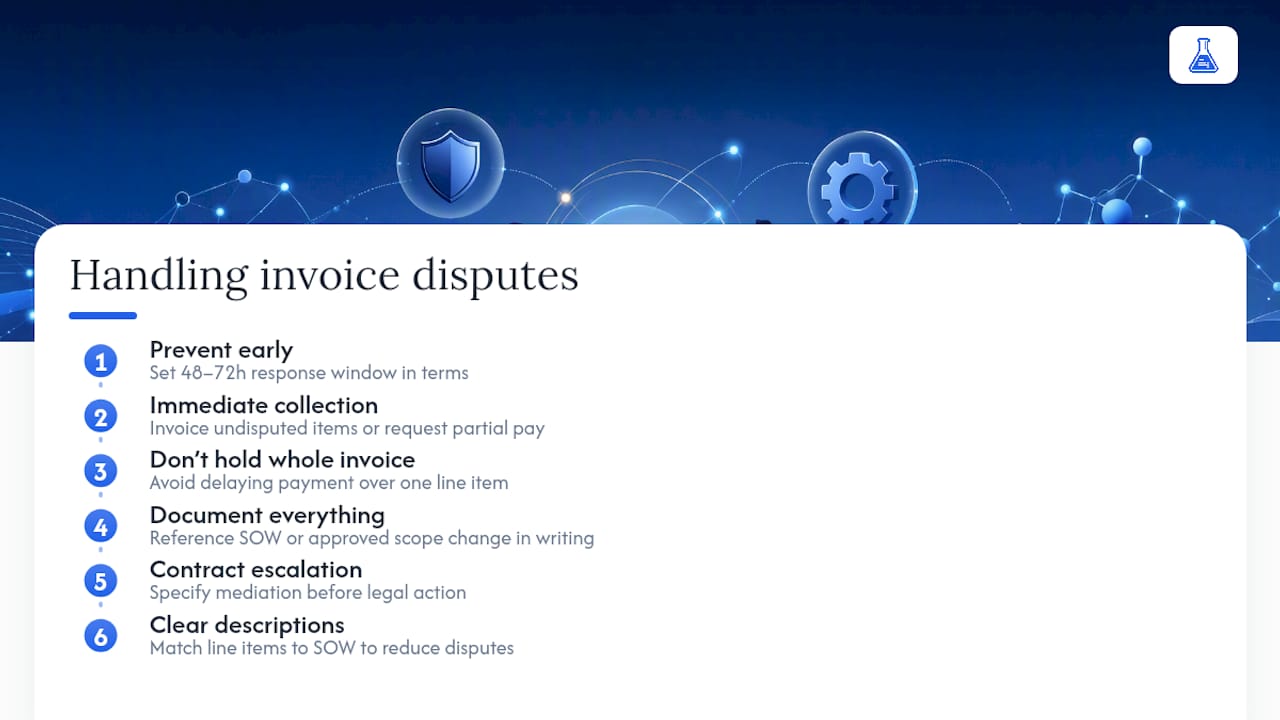
Most invoice disputes come down to one of two things: a line item the client doesn’t recognize, or a total that doesn’t match their expectation from the SOW. Handling them well starts before the dispute happens, not after.
Give every invoice a short response window, typically 48 to 72 hours, where the client can flag a concern before the payment clock effectively starts counting toward escalation. State that window in your payment terms so it’s not a surprise when you reference it later.
When a client does flag an issue, resolve the undisputed portion immediately. If three of five line items are fine and one is in question, invoice the four clean items separately or ask for partial payment while the disputed item gets reviewed. Holding an entire invoice hostage over one questioned line only slows down money you were already owed.
Keep a written trail. Reference the SOW section or approved scope change that backs the disputed charge, and put that reference in writing, even if the original conversation happened on a call. If the disagreement escalates past a quick email exchange, most agency contracts should specify a resolution path, commonly mediation before either party considers legal action, and that clause is worth reviewing whenever you draft a new SOW.
The agencies with the fewest disputes are usually the ones with the clearest line-item descriptions to begin with. A vague description invites a question. A description that mirrors the SOW rarely does.
What changes with international agency clients?
Billing a client outside your home market adds currency, tax treatment, and payment timing questions that a domestic invoice never has to answer.
Decide which currency you’re invoicing in and state it clearly on the invoice itself. Some agencies bill in their own currency and let the client’s bank handle conversion; others bill in the client’s local currency to avoid disputes over exchange-rate timing. Either works, but pick one per client and stay consistent, since switching currencies mid-engagement is a common source of confused payments.
VAT treatment depends on where your client is based and whether they’re VAT-registered themselves. Invoicing a business client in another country often shifts VAT accounting to the client under the reverse charge mechanism, meaning you may not charge UK VAT on that invoice at all. The rules differ by client location and structure, so check the specific treatment for each country you invoice into rather than assuming one rule covers every international client.
International payments also take longer to clear, particularly with bank transfers across currencies. Building a slightly longer collection window into your terms for international clients, and offering a card payment link as an alternative to wire transfer, tends to shrink that gap. Multi-currency support in your invoicing tool removes most of the manual conversion guesswork.
How does VAT apply to agency invoices?
If your agency is VAT-registered, every invoice needs your VAT number and the VAT amount broken out separately from the net fee, as required under UK invoicing rules. That applies to your service fees. Pass-through costs need closer attention.
Media spend, software licenses bought on a client’s behalf, and similar pass-through costs may carry their own VAT treatment, and whether you charge VAT on top of a pass-through, or pass it through at cost, depends on how your contract structures that cost and whether you’re acting as principal or agent for VAT purposes. Get this wrong and you either undercharge VAT you owed or overcharge a client who then disputes the invoice. Separating pass-throughs and any markup on their own labeled line, rather than folding them into your service fee, prevents that confusion and makes it obvious to the client’s finance team which costs are being reimbursed versus billed as agency revenue.
If your agency sits below the VAT registration threshold, you don’t charge VAT at all, but you still need every other legally required field on the invoice. Whichever position applies to your agency, state it consistently. Switching VAT treatment between invoices for the same client is one of the fastest ways to trigger a finance department’s manual review, which slows down the exact payment you’re trying to speed up.
How Invoicelabs applies these agency invoicing principles
Every recommendation in this guide maps directly to how Invoicelabs is built. Quick invoice creation and real-time tax calculations mean the legal fields covered earlier, including VAT breakdowns, populate automatically instead of getting manually rekeyed on every invoice.
Branded, profession-specific templates handle the layout differences between retainer, milestone, and time-and-materials billing without starting from a blank document each time. Stripe payment links embed directly in the invoice, closing the reconciliation gap that manual bank transfers create, and status tracking shows the moment a client views or pays an invoice, so follow-ups happen on fact rather than guesswork. Together, these features turn the checklist above into something closer to a five-minute task than a monthly chore.
Getting your agency set up with better invoicing
Invoicelabs is built for the exact workflow this guide describes: standardized templates, automated delivery, and payment links that get you paid without a week of chasing.

Many features, from SOW-friendly line items to embedded payment links and invoice status tracking, are included as part of the platform. Agencies juggling retainer, milestone, and time-and-materials clients can use a consistent system instead of multiple spreadsheets. Strong security and transparent pricing mean you’re not trading speed for risk.
If you want to see the template structure in action before committing to anything, generate a free branded invoice in under a minute and check how it handles your own line items. Consultants and designers running project-based work can start from a ready-made consultant template instead of building one from scratch. For a deeper look at automating time and expense tracking into your invoicing, Invoicelabs’s own billing and invoicing guide walks through the setup step by step, and readers wanting the finance-team side of automation can also check this invoice processing automation guide for UK teams.
Sources
Recommended
Send your next invoice in seconds
Create professional invoices, track payments and get paid faster — free to start.


