Get Paid Faster: 5 Stage Mapped Overdue Invoice Email Templates
Send a short reminder that names the invoice number, the amount owed, and how many days it’s overdue, then attach the invoice PDF again and drop in a one-click payment link with a specific deadline. Keep the tone factual, not desperate. Most late payments come down to a missed email or a forgotten to-do, not a refusal to pay, so a clear, low-friction nudge resolves the majority of cases within a week.
TL;DR:
- Most overdue invoices are delayed due to missed emails or forgotten tasks, not outright refusal to pay, and a clear reminder often resolves the issue within a week.
- The timing and tone of reminder emails should be adjusted based on how many days overdue the invoice is, ranging from friendly nudges to final notices.
- Including the exact invoice number, amount, days overdue, and a one-click payment link in every message improves response rates and reduces delays.
- Escalation should follow a scheduled approach, starting with emails within a few days overdue and moving to phone calls or formal letters after 45 days or more.
- Automating reminder sequences requires correct setup, such as trigger timing, dynamic fields, and instant invoice re-attachments, with pauses for disputes or partial payments.
Table of Contents
- Overdue Invoice Email Templates for Every Stage
- Core Elements Every Overdue Invoice Email Needs
- When to Escalate: A Days-Overdue Timetable
- Subject Lines and Deliverability Basics
- What to Do When Email Stops Working
- Automation and the Pre-Send Checklist
- What Actually Moves the Needle on Late Payments
- Getting These Templates Running Without the Admin Work
- Sources
Overdue Invoice Email Templates for Every Stage
The tone of an overdue invoice email should shift as the days pile up. A message sent one day late should read nothing like one sent at 45 days. Below are five templates mapped to where the invoice actually stands, plus subject lines you can lift directly.
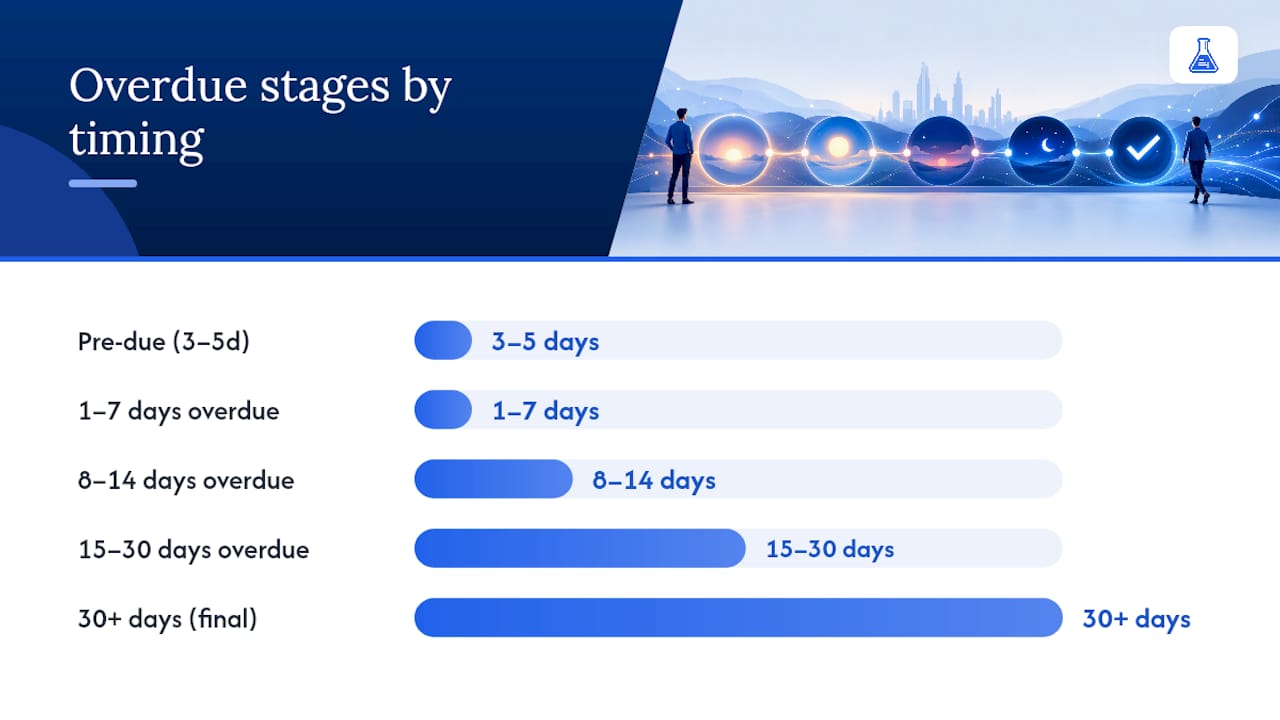
Pre-due (3 to 5 days before the due date)
Subject: “Invoice #1042 due in 5 days — link inside”
Hi [Name], just a quick heads-up that Invoice #1042 for $850 is due on [date]. Here’s the [payment link] if you’d like to settle it early. The invoice PDF is attached again in case it got buried. Thanks for the business.
1 to 7 days overdue (friendly nudge)
Subject: “Invoice #1042 is now 3 days overdue”
Hi [Name], hope things are going well. Invoice #1042 for $850 was due on [date] and shows as 3 days overdue in our records. I’ve attached it again along with a [payment link] so you can clear it in a click. If it’s already been paid, let me know and I’ll update our books.
8 to 14 days overdue (firm follow-up)
Subject: “Following up: Invoice #1042, 10 days past due”
Hi [Name], I wanted to follow up on Invoice #1042 ($850), now 10 days past its due date of [date]. Could you confirm a payment date, or let me know if there’s an issue on your end? I’m happy to loop in your accounts team if that helps move things along. [Payment link] attached for convenience.
15 to 30 days overdue (strong request)
Subject: “Invoice #1042: 22 days overdue, action needed”
Hi [Name], Invoice #1042 for $850 is now 22 days overdue against a due date of [date]. Per our payment terms, this needs settling within the next 5 business days to avoid a late fee. Please use the [payment link] or reply with a payment date so we can note it on file.
30+ days / final notice
Subject: “Final notice: Invoice #1042, 45 days overdue”
[Name], this is a final notice regarding Invoice #1042 for $850, now 45 days past due. Despite three prior reminders sent on [dates], we have not received payment or a response. Please settle this within 7 days using the [payment link]. If we don’t hear back, we will need to pause further work and consider next steps, including referring the account for collection.
A few rules apply across all five stages:
- Never invent a deadline you have no intention of enforcing.
- Always re-attach the invoice, since many delays happen simply because the original got lost in an inbox.
- Reference the exact number of prior reminders sent once you’re past the second email, since it establishes a paper trail.
Core Elements Every Overdue Invoice Email Needs
A reminder for unpaid invoice only works if it removes every excuse for delay. That means the recipient shouldn’t need to dig through old emails or log into a portal to figure out what they owe.
Your subject line should state the invoice number, the amount, and the days overdue wherever possible. Something like “Invoice #1042: $850, 12 days overdue” tells the recipient exactly what they’re opening before they even click.
The first two lines of the email body need to repeat that same information: invoice number, original due date, exact amount, and current days overdue. Don’t make the reader hunt for it.
- Attach the original invoice PDF every time, not just on the first send.
- Include a one-click payment link that goes straight to the invoice’s payment page, not a general login screen.
- Name a real contact person with a direct phone number or email, especially past the first reminder.
- State late fees or contract terms factually, citing the specific clause rather than a vague threat.
If your contract allows for late fees or statutory interest, reference the actual terms rather than a generic warning. UK-based businesses can charge interest and compensation on late commercial payments under the late payment rules, and citing that framework by name carries more weight than a bare “or else” line.
Pro Tip: Swap “please pay this invoice” for “please confirm a payment date.” Asking for a specific commitment gets replies far more often than a generic request for money.
When to Escalate: A Days-Overdue Timetable
An overdue payment reminder email needs a schedule behind it, and that schedule should be built from the invoice’s own due date, not the calendar. A reminder fired on the 1st and 15th of every month treats a two-day-late invoice the same as a forty-day-late one, which either annoys prompt payers or lets serious delinquents slide too long. Automation tools should trigger reminders by days past due calculated per invoice, not by fixed dates.
| Days overdue | Action | What to ask for |
|---|---|---|
| 1 to 3 days | Friendly email reminder | Confirmation payment is in progress |
| 7 to 10 days | Firmer email, mention prior reminder | Specific payment date |
| 15 to 30 days | Strong email, reference terms/late fee | Payment date or payment plan |
| 45 to 60 days | Phone call plus email | Escalation to finance or AP contact |
| 60+ days | Formal letter, consider collections | Final resolution or referral |
Once you’re past 60 days with no response, continuing to fire automated emails into a silent inbox usually signals a weak collection process rather than persistence. At that point, switch to phone or direct human outreach instead of another automated nudge. If the client has gone fully unresponsive, the escalation ladder for invoices clients refuse to pay covers what comes after email and calls stop working.
Subject Lines and Deliverability Basics
A well-written follow-up on an unpaid invoice can still land in spam if the technical setup behind it is sloppy. Deliverability problems quietly kill more reminder campaigns than bad copy does.
- Keep subject lines short and factual: “Invoice #1042, $850, 3 days overdue” beats anything vague or salesy.
- Send from a transactional sender domain, not your marketing newsletter address, and confirm your SPF, DKIM, and DMARC records are properly configured.
- Watch bounce rates closely. A high bounce count on a shared sending domain drags down deliverability for every other email you send from it.
- Keep the body under roughly 120 words, with one clear call to action and no more than one link competing for attention.
- Plain text or lightly formatted HTML tends to outperform heavily designed templates for transactional messages like these.
What to Do When Email Stops Working
Email carries most of the load early on, but it loses effectiveness the longer an invoice sits unpaid. Here’s how to escalate deliberately:
- Phone. Keep the call short: confirm the invoice status, ask for a firm payment date, and if the person you reach can’t commit, ask to be connected to whoever can approve payment.
- SMS or WhatsApp. Reserve this for smaller, informal clients you already text regularly. Include the invoice number and a payment link, nothing more.
- Postal letter or final notice. Send this once you’ve documented multiple email and phone attempts. Make it formal, dated, and explicit about the final deadline.
- Legal or collections referral. Only take this step once you’ve documented every prior reminder and you’re genuinely ready to follow through. Threatening legal action you won’t pursue weakens your position more than staying silent would.
Automation and the Pre-Send Checklist
Automating your overdue invoice email sequence saves hours, but only if it fires the right message at the right moment and knows when to stop. A checklist run before every send catches the mistakes that damage client relationships.
- Trigger reminders by days past due calculated from each invoice, never from a fixed calendar date.
- Build in hold flags that pause the sequence automatically for disputed invoices, agreed payment plans, or consolidated billing arrangements.
- Populate dynamic fields correctly: invoice number, amount, days overdue, and PO number where the client’s accounts payable team requires one.
- Re-attach the invoice PDF and include a working one-click payment link on every single send, not just the first.
- Sync your invoicing and payment systems in near real time. Webhook-based updates or hourly syncing at minimum prevent the embarrassing case of a reminder going out after the client already paid.
Pro Tip: Automated sequences should pause the moment a client replies, disputes a charge, or makes a partial payment. Nothing erodes trust faster than a bot demanding money someone just sent.
If you’re setting this up from scratch, the guide on configuring invoice payment reminders for small teams walks through the setup in a couple of hours. For automation patterns borrowed from sales teams chasing leads rather than invoices, the practical guide to automated follow-up emails covers similar cadence logic worth adapting.
What Actually Moves the Needle on Late Payments
The biggest shift I’ve seen in overdue invoice copy isn’t tone. It’s the specific ask. Swapping “please remit payment” for “can you confirm a payment date by Friday” turns a passive request into something the recipient has to actively respond to. People will ignore a bill. They’re far less comfortable ignoring a direct question.
The other habit worth building: never write a consequence into an email you’re not prepared to carry out. If you mention pausing work or referring an account to collections, mean it, and have already documented the reminders that came before. Bluffing gets found out fast, and once a client learns your deadlines are soft, every future deadline gets ignored too.
— Black Flame Digital
Getting These Templates Running Without the Admin Work
Writing sharp reminder emails is one problem. Keeping track of which invoice needs which template, on which day, is another, and it’s the one that actually eats your afternoon. This service can create an invoice quickly, attach a payment link automatically, and track its status without digging through email threads to figure out who still owes what.

For freelancers and small teams sending a handful of invoices a month, that status tracking alone removes the guesswork about who needs a nudge today versus who paid last night. You can start with the free invoice generator for a one-off invoice with no signup required, or browse profession-specific formats like the invoice template for consultants if you want a document ready to attach to your next reminder. Either way, the next step is the same: generate the invoice, grab the payment link, and send today’s reminder before the day slips by.
Sources
- Gov
- How to recover unpaid invoices legally in the UK - DRN Law
- Automated overdue invoice reminders - QuickFile support
Recommended
Send your next invoice in seconds
Create professional invoices, track payments and get paid faster — free to start.


