SMBs: Fix Dirty Quote Data and Automate the Quote-to-Invoice Process
Quote-to-invoice is the workflow that turns an approved sales quote into a bill ready for payment, moving through quote creation, customer approval, conversion, delivery, and payment tracking. Start by standardizing every required field at the quote stage. That single change (product codes, tax categories, payment terms, a unique quote ID) is what makes automated conversion reliable instead of a source of billing errors.
TL;DR:
- Standardizing quote data with fixed codes and dropdowns significantly reduces errors during automatic conversion to invoices.
- Automated workflows ensure quick invoicing and faster payments, especially with embedded payment links and timely reminders.
- Proper approval matrices based on invoice value prevent bottlenecks and enforce role separation, decreasing approval delays.
- Running manual validation for two weeks helps identify intervention points and refine validation rules before full automation.
- Focusing on clean quote inputs and linked project data reduces common pitfalls like data drift and double billing in recurring projects.
Table of Contents
- What Are the Steps in the Quote to Invoice Process?
- Why Automating the Quote to Invoice Flow Pays Off
- Best Practices for Automating Quote to Invoice Conversion
- How Should You Structure Invoice Approval and Controls?
- Common Pitfalls in Automated Invoicing and How to Fix Them
- How InvoiceLabs Reduces Quote to Invoice Friction
- Why Quote Expiration Tracking Increases Conversion Rates
- Handling Partial Invoicing From a Single Quote
- Which KPIs Show Whether Your Process Is Working?
- What Actually Matters in Quote to Invoice Automation
- Get Your Invoices Out Faster With InvoiceLabs
- Sources
What Are the Steps in the Quote to Invoice Process?
The quote-to-invoice process has five stages, and skipping the discipline in any one of them is usually why invoices bounce back for correction. Here’s what each stage actually needs to capture.
-
Create the quote. Use a template, not a blank document. Every quote needs a unique quote ID, itemized product or service codes, the applicable tax rate, and payment terms stated up front (net 14, net 30, due on receipt). Free-text description fields are fine for context, but pricing, tax, and terms should come from fixed pick-lists so nothing downstream has to be re-typed.
-
Send it and get approval. Digital acceptance (a click-to-approve link or e-signature) beats email back-and-forth because it timestamps the decision and locks the terms. Build in how you’ll handle partial acceptances here, not after the fact. If a customer approves three line items out of five, your system needs a rule for what happens next, not a scramble.
-
Convert to invoice. Most accounting platforms, including Xero, offer a direct “create invoice from quote” action that copies line items, pricing, and customer details across automatically. Convert is not the same as sending. Always review the converted invoice for tax recalculation, currency, and any last-minute quote revisions before it goes out.
-
Send the invoice with payment options attached. An invoice with an embedded payment link gets paid faster than one that asks the customer to log in somewhere else or post a check. State the due date and accepted payment methods on the document itself, not in a separate email.
-
Track payment and reconcile. Update invoice status the moment money lands, whether that’s “paid,” “partially paid,” or “overdue,” and feed that status back into your accounting system so your books and your invoicing tool never disagree about what’s owed.
Why Automating the Quote to Invoice Flow Pays Off
Manual re-entry between a quoting document and an invoicing tool is where most billing delays start. Someone copies numbers from a PDF quote into an invoice template, transposes a digit, and now a client is disputing a bill three weeks later instead of paying it. Automating the handoff between quote and invoice removes that re-entry step entirely, since the invoice inherits its data directly from the approved quote.
The math on manual re-entry: every field a person retypes between systems is a chance for a transposed number, a missed line item, or a tax rate that doesn’t match the original quote. Automated field-mapping removes that step, not just the risk of it.
The payoff shows up in three places:
- Speed. Invoices go out the moment a quote is approved, rather than sitting in someone’s “to do this afternoon” pile.
- Accuracy. Fields carry over exactly as entered at the quote stage, so tax, pricing, and terms can’t drift between documents.
- Cash flow. Faster delivery plus embedded payment links and automated reminders shortens the gap between “job done” and “money in the bank.”
None of this requires enterprise software. A contractor running five jobs a month gets the same benefit as an agency running fifty: fewer touchpoints between “customer said yes” and “invoice sent” means fewer places for something to go wrong.
Best Practices for Automating Quote to Invoice Conversion
Automation breaks when the data feeding it is messy, not when the software is bad. The fix starts at the quote, not at the invoice.
- Standardize quote inputs. Replace free-text product fields with pick-lists tied to SKUs or service codes. Tax categories and payment terms should be dropdown selections, never typed manually, since inconsistent quote data is the most common reason automated conversions fail.
- Use templates and lock the fields that matter. A quote template with editable line-item quantities but fixed tax logic and terms structure prevents small formatting differences from breaking your mapping rules later.
- Build conditional logic for partial acceptances. If a customer accepts four of six line items, the system should either generate a split invoice for what was approved or route the quote to a person for adjustment, rather than converting the full amount by default.
- Integrate quoting with accounting and payments. Connecting your quoting tool to platforms like Xero, QuickBooks, or a Stripe-based payment flow means one source of truth for customer records and product pricing, rather than three separate spreadsheets that drift out of sync within a quarter.
- Keep project data linked from day one. For project-based billing, tie the job or project ID to the quote at creation so partial invoicing later doesn’t require anyone to hunt down which quote a payment belongs to.
Pro Tip: Before switching on full automation, run it manually for two weeks and log every place a person had to intervene. Those intervention points are exactly where your validation rules are missing.
How Should You Structure Invoice Approval and Controls?
Invoices stall for one of two reasons: nobody knows who’s supposed to approve them, or the person who’s supposed to approve them is also the person who entered the data. Both problems get solved with an approval matrix built around dollar thresholds and role separation.
The logic is simple once it’s encoded: small invoices clear automatically, mid-size invoices need one sign-off, and large or unusual ones need a second look before they go out the door.
| Invoice value band | Approval required | Who approves |
|---|---|---|
| Under a low dollar amount | Auto-approved | System, no human review |
| A moderate amount | Single approval | Project manager or team lead |
| A higher amount | Two-step approval | Manager plus finance lead |
| Large amounts | Full review | Finance lead plus owner or director |
Segregation of duties matters here: the person who creates the quote should not be the same person who approves the invoice or reconciles the payment. When a small team makes that separation hard, at minimum log every edit with a timestamp and name attached, so there’s an audit trail if a number looks wrong later. Exceptions (unusual discounts, rush terms, credit memos) should route to a named person rather than sit in a generic queue, and every approved invoice should sync back to your accounting system automatically so your books and your invoicing tool tell the same story.
Common Pitfalls in Automated Invoicing and How to Fix Them
Most quote-to-invoice automation fails in the same four places, and each has a specific, testable fix.
- Dirty data at the quote stage. Free-text product names and tax fields cause mismatched line items downstream. Fix it with mandatory pick-lists and validation rules that block a quote from saving until required fields are populated correctly.
- Partial acceptances handled as full conversions. If a customer signs off on part of a quote and your system bills the whole thing, that’s a dispute waiting to happen. Build a pause-for-review rule any time approved line items don’t match the original quote total.
- Manual edits after conversion, with no record of the change. A person tweaking an invoice post-conversion without logging it is how audits go sideways. Gate any post-conversion edit behind a review step and keep a change log.
- Integration drift between quoting and accounting tools. Field mappings that worked at setup can quietly break after a software update. Pilot new integrations with your top 10 to 20 customers first and reconcile every field before rolling out company-wide.
Pro Tip: Run a monthly spot check on five random converted invoices against their source quotes. It takes ten minutes and catches mapping drift before it becomes a pattern.
How InvoiceLabs Reduces Quote to Invoice Friction
Where automation breaks down for most small teams, it usually breaks down at the manual handoff between systems. Invoicelabs addresses that gap directly: invoices generate in under 30 seconds with tax calculated in real time, delivered instantly, and tracked automatically so status updates happen without a spreadsheet.
That speed matters most for freelancers, agencies, and small businesses sending repeat invoices to the same clients. Rather than build a quote workflow from scratch, you can start with a free invoice generator or a profession-specific template and adapt it as your process matures. Every invoice runs through Stripe for card payments and bank-grade security, so speed doesn’t come at the cost of trust.
Why Quote Expiration Tracking Increases Conversion Rates
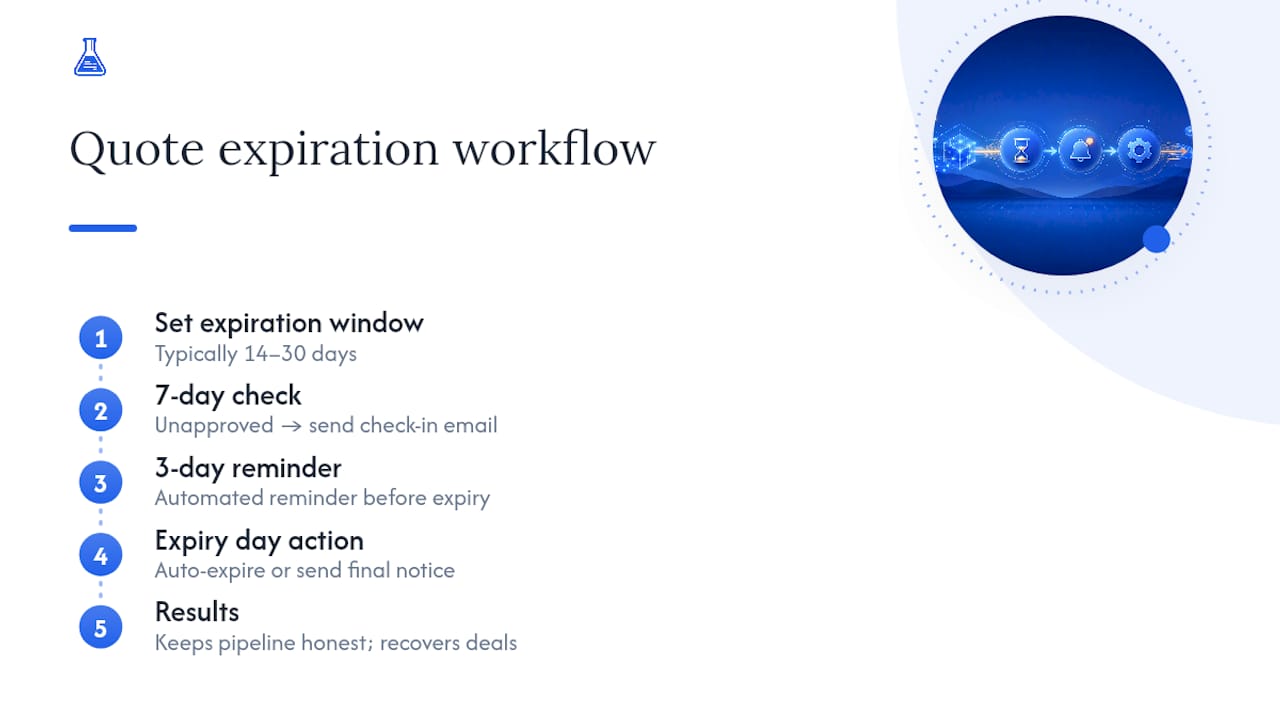
A quote with no expiration date is a quote that sits in someone’s inbox indefinitely, and every week it sits there, the odds of it converting drop. Setting an explicit expiration window (typically 14 to 30 days depending on the size of the job) forces a decision instead of leaving it open-ended.
The mechanism that actually moves conversion rates is follow-up timing, not just the deadline itself. An automated reminder sent three days before expiration, followed by a second one on the expiration date, catches customers who intended to approve but got busy. Manually tracking this across a dozen open quotes is where most small businesses lose deals, not because the customer said no, but because nobody followed up before the quote went stale.
Build the rule once: any quote unapproved after seven days triggers a check-in email, and any quote reaching its expiration date either auto-expires (removing it from your pipeline reporting) or triggers a final notice. That structure does two things at once. It keeps your pipeline numbers honest, since stale quotes stop inflating your projected revenue, and it recovers deals that were genuinely still live but forgotten. Treat quote expiration less as an administrative deadline and more as a scheduled prompt to have a second conversation with the customer.
Handling Partial Invoicing From a Single Quote
Not every approved quote should become one invoice. Long projects, staged deliveries, and milestone-based contracts routinely need multiple invoices generated from a single source quote, and this is where a lot of manual processes quietly fall apart.
The cleanest approach ties each invoice back to specific line items or a percentage of the original quote total, rather than treating the quote as a single lump sum. Each partial invoice should reference the source quote ID so anyone reviewing the account later can see the full picture without cross-referencing three separate documents.
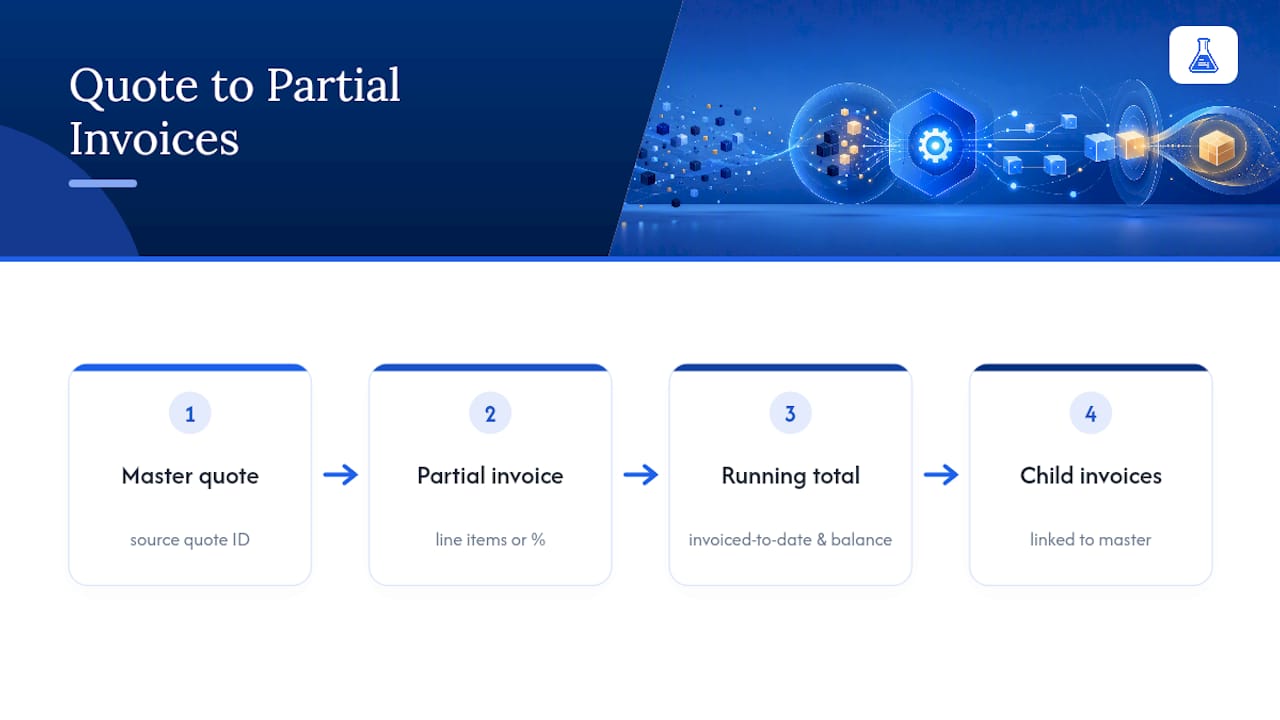
Two things break this most often. First, invoicing the same line item twice because nobody marked it as already billed. The fix is a running “invoiced to date” total attached to the quote itself, updated automatically with each partial invoice generated. Second, losing track of what’s left to bill on long projects, which the same running total solves as a byproduct. Keep the original quote as the master record and every invoice as a child document tied to it. That structure alone prevents the double billing disputes that damage client relationships faster than almost anything else in the process.
Which KPIs Show Whether Your Process Is Working?
You can’t fix a slow quote-to-invoice cycle if you’re not measuring where the time actually goes. A handful of metrics tell you almost everything that matters.
Quote-to-approval time measures how long a customer takes to sign off after receiving a quote. If this number is creeping up, your follow-up cadence needs adjusting, not necessarily your pricing.
Approval-to-invoice time measures your own internal speed, from the moment a quote is accepted to the moment an invoice goes out. This is the number automation improves most directly, since a manual handoff might take days while an automated convert-and-send trigger takes minutes.
Days sales outstanding (DSO) tracks the average time between sending an invoice and getting paid. This is your clearest cash flow indicator, and it’s the metric most affected by whether your invoices include a direct payment link.
Invoice error rate tracks how many invoices get disputed, corrected, or reissued after sending. A rising error rate almost always points back to dirty data at the quote stage, not a problem with the invoice itself.
Track these four monthly, not quarterly. Quote-to-invoice friction tends to creep in gradually, and a quarterly review catches it long after it’s cost you real cash flow.
What Actually Matters in Quote to Invoice Automation
Most advice on this topic treats automation like a software purchase: buy the right tool, connect it to your accounting platform, and the problem solves itself. That’s backwards. The businesses that get quote-to-invoice right treat automation as a data discipline problem first and a software problem second. A $10,000 platform connected to a quoting process full of free-text fields and inconsistent tax categories will produce exactly as many errors as the spreadsheet it replaced, just faster.
The conventional advice also underrates approval design. Most small businesses either have no approval structure at all or one so rigid that every invoice, regardless of size, needs a director’s sign-off. Neither works. An approval matrix scaled to actual risk, small invoices clearing automatically, larger ones getting real scrutiny, is what keeps cash moving without sacrificing control.
If you take one thing from this article, make it this: fix your quote inputs before you automate anything. Everything downstream depends on it.
— Black Flame Digital
Get Your Invoices Out Faster With InvoiceLabs
Invoicelabs is the fastest path from an approved quote to a paid invoice, built for the exact friction points this article covers: manual re-entry, slow delivery, and payment tracking that lives in three different places. Where spreadsheet-based invoicing costs you an afternoon of formatting and copy-pasting, Invoicelabs generates a professional, tax-calculated invoice in under 30 seconds.

Freelancers, contractors, and agencies use it to keep brand-consistent invoices going out the moment a quote is approved, with Stripe payment links attached so clients can pay immediately instead of waiting on a bank transfer. Multi-currency support and bank-grade security mean the platform scales whether you’re billing one local client or a dozen across borders.
Start with the free invoice generator on your next approved quote and see how much faster payment tracking feels when the whole process lives in one place.
Sources
Start implementation with Xero’s quote-to-invoice conversion guide and Corpay’s breakdown of approval workflow design for the technical detail this article summarizes.
- What is Quote-to-Invoice? | DealHub
- How to use quote to cash (Q2C) | Stripe
- Invoice Approval Workflows: How to Design Routing That Stops Stuck Invoices | Corpay
- Create an invoice from a quote | Xero Central
Recommended
Send your next invoice in seconds
Create professional invoices, track payments and get paid faster — free to start.


