3 Invoice Emails Accounts Payable Can Process in 10 Seconds
Attach the invoice as a PDF, write a subject line with “Invoice,” the invoice number, and the due date, and keep the email body to three or four sentences that repeat the total and a payment link. Send it to the actual billing contact, not just your usual project contact, and set a calendar reminder to follow up. Do that consistently and you fix most of what delays payment before it starts.
TL;DR:
- Including the invoice number, total, and due date in the email subject line ensures quick sorting and prioritization by accounts payable teams.
- Attaching a clearly named PDF with consistent invoice details across the document and email reduces delays caused by mismatched information.
- Sending invoices to the correct, specific billing contact and requesting confirmation minimizes misplaced invoices and unresolved payment stalls.
- Providing precise payment instructions in both the PDF and email body, especially with a prominent pay button, shortens the time to receive payments.
- Using templates for different billing stages and following a set follow-up cadence maintains professionalism and prompts timely settlement.
Table of Contents
- How to Email an Invoice the Right Way
- Subject-Line Formulas That Get Invoices Opened
- PDF Attachments and File Naming That Avoid Delays
- Who Actually Receives Your Invoice Email
- What Payment Instructions Belong in the Email
- Copy-Paste Templates for Every Stage of Billing
- How Often to Follow Up Without Damaging the Relationship
- The Pre-Send Checklist That Prevents Most Delays
- Common Mistakes That Slow Down Payment
- Security and Privacy Practices for Invoice Emails
- Why We Built InvoiceLabs Around Speed and Tracking
- Send Your Next Invoice in Under a Minute
- Sources
How to Email an Invoice the Right Way
Getting paid on time usually comes down to whether the recipient can act on your email in under ten seconds. Accounts payable staff scan dozens of messages a day, and an invoice email that forces them to hunt for the amount or dig through an attachment gets pushed to the bottom of the pile. Shopify’s guidance on invoice emails recommends keeping the body to three to five sentences: a greeting, a one-line description of the work, the total and due date, and a direct call to action.
That structure works because it mirrors how AP teams process requests. They’re not reading your email for context. They’re confirming three facts (who, how much, by when) and then either paying or filing it for later.
A cover note that hits every point without padding looks like this:
- Open with a short greeting and a one-line thank-you: “Hi Maria, thanks again for the opportunity to work on the Q1 campaign.”
- State the purpose plainly: “Please find attached Invoice INV-042 for the branding project completed this month.”
- Put the total and due date in the first two lines, not buried at the bottom.
- Add one line of payment instruction or a pay link, plus who to contact with billing questions.
- Close politely: “Thanks for your prompt attention. Let me know if you have any questions.”
Five sentences, no filler, and the recipient never has to open the PDF just to know what they owe.
Subject-Line Formulas That Get Invoices Opened
A subject line that buries the invoice number is the fastest way to get lost in a shared inbox. Stripe’s invoice email guidance points out that including the word “Invoice,” the invoice number, and the due date lets AP teams search, sort, and prioritize without opening a single message.
A reliable formula: Invoice [number] from [your company], due [date]. Adjust slightly depending on the message type:
- First invoice: “Invoice INV-042 from Dune Design Co, due March 12, 2026”
- Recurring monthly invoice: “Invoice INV-118, February Services, due Feb 28”
- Friendly reminder: “Reminder: Invoice INV-042 due tomorrow”
- Overdue notice: “Overdue: Invoice INV-042 (7 days past due)”
Keep the format identical every time you bill the same client. Consistency helps your own record keeping just as much as theirs. If AP has to guess whether “INV042” and “Invoice #042” are the same document, you’ve added friction you didn’t need to create.
PDF Attachments and File Naming That Avoid Delays
PDF is the standard for a reason: it locks formatting so numbers can’t shift in transit, and it’s the format Adobe’s guide to sending invoices by email recommends over pasting invoice details directly into the message body. Name the file so a stranger could identify it a year from now: something like Invoice-INV-042-DuneDesignCo.pdf, not Invoice.pdf or Final2.pdf.
If the client’s process runs through a pay link rather than a bank transfer, include that link in the email body in addition to the attached PDF. Keep the file size reasonable, and if a client specifically requests password protection for sensitive amounts, honor it. Some larger clients require invoices uploaded to a supplier portal instead of, or alongside, email. When that’s the case, upload it there and still send the email. Portals get missed too.
Who Actually Receives Your Invoice Email
Sending an invoice to the wrong inbox is one of the most common reasons payment stalls, and it’s entirely avoidable. During onboarding, ask directly: who processes invoices, what email address should receive them, and whether a purchase order or reference number is required.
- For larger clients, send to the accounts-payable address, not the project manager who hired you. AP teams and day-to-day contacts often work from entirely separate systems.
- CC your main contact so they know the invoice went out and can nudge internally if it stalls.
- For a new billing contact, add one line asking for confirmation: “Could you confirm receipt of this invoice?”
- If a PO number is required and you don’t have one, get it before sending. An invoice without a mandatory PO often gets automatically rejected.
Confirming receipt turns an unknown delivery status into a known one, which matters more than it sounds. A silent inbox tells you nothing. A one-line “confirmed, thanks” tells you the clock is officially running.
What Payment Instructions Belong in the Email
The single biggest source of unnecessary delay is forcing the payer to ask “how do I actually pay this?” Every method you accept needs to appear with exact details, not a vague pointer to “see attached.”
- Bank transfer: account name, account number, sort code or IBAN/BIC as applicable.
- Card or online payment: a direct pay link, not a request to “visit our website.”
- Reference instructions: tell the payer to use the invoice number as the payment reference, so reconciliation on your end is instant.
Repeat these details in both the PDF and the email body. GoCardless’s research on invoice emails found that including a direct pay link and repeating instructions in both places measurably shortens time to payment compared with bank-details-only invoices.
Pro Tip: A single, clearly labeled “Pay Now” button or link outperforms a paragraph of bank details every time. Payers act on the path of least resistance, and a button is the shortest path there is.
Copy-Paste Templates for Every Stage of Billing
Editing a template from scratch every time you invoice wastes time you don’t have. Keep these three on hand and swap in the details.
-
Initial invoice. “Hi [Name], thanks for the opportunity to work on [project]. Please find attached Invoice [number] for $[amount], due [date]. You can pay via [method/link], and using the invoice number as your reference helps us match payment quickly. Let me know if you have any questions.”
-
Polite reminder (a few days before or just after due date). “Hi [Name], just a quick note that Invoice [number] for $[amount] is due [date/was due on date]. If it’s already been processed, feel free to disregard this. Otherwise, here’s the payment link again: [link]. Thanks for your help.”
-
Overdue notice. “Hi [Name], I wanted to flag that Invoice [number] for $[amount], originally due [date], is now [X] days past due. Per our agreed terms, could you let me know the current payment status? Happy to resend any details you need. If I don’t hear back by [date], I’ll need to follow up by phone.”
Adjust the tone based on the relationship. A long-standing client gets warmth and benefit of the doubt. A new client on a first invoice gets slightly more formal language, since you haven’t built the shorthand yet. Either way, never drop the invoice number, amount, or due date from any message in the sequence.
How Often to Follow Up Without Damaging the Relationship
Persistence works better than patience alone, but only with a plan. Stripe recommends a cadence that’s firm without feeling aggressive:
- Send the invoice, then optionally a friendly reminder a few days before it’s due.
- First follow-up one to three days after the due date passes.
- Second follow-up about a week after that.
- Final notice two or more weeks past due, referencing your payment terms directly.
If a call feels more appropriate than another email, especially past the second follow-up, make it. Escalate to a named accounts-payable contact if your usual contact goes quiet. Late fees or pausing further work should only kick in if your original terms actually specify them. Keep a simple log of every send, reply, and payment update. That log becomes essential if a payment dispute ever needs a paper trail.
The Pre-Send Checklist That Prevents Most Delays
Run through this before you hit send, every time:
- Client name, billing contact, and email address are correct.
- Invoice number, issue date, and due date match across the PDF and the email.
- Totals and any tax are calculated correctly and match what was quoted.
- The PDF is attached (not just referenced) and named clearly.
- Payment instructions appear in both the PDF and the email body.
- A follow-up reminder is scheduled before you close the tab.
- A copy of the sent email is saved for your records.
Thirty seconds of checking here saves days of chasing later.
Common Mistakes That Slow Down Payment
Most late payments aren’t about a client refusing to pay. They’re about small errors that give AP a reason to set the invoice aside. Sending to a generic “info@” address instead of the actual billing contact is the top offender, followed closely by a vague subject line like “Invoice attached” that gets buried within hours.
Pasting invoice details directly into the email body instead of attaching a proper PDF creates formatting problems and looks less professional. Forgetting to include payment instructions, or including them only in the attachment and not the email, forces the recipient to open a document they might not get to right away. Inconsistent invoice numbering across months makes your own reconciliation a headache and confuses clients who reference old numbers.
Another frequent mistake: assuming the invoice was received just because it was sent. Without a confirmation request, you have no way of knowing whether it landed in a spam folder, got auto-filtered, or simply got missed. Waiting too long to follow up compounds this. Clients rarely chase down a supplier to say “hey, I never got that invoice.” They wait for you to notice.
Finally, mismatched details between the invoice PDF and the email body (a different total, a typo in the due date) create doubt that stalls payment while someone double-checks which version is correct. Keep both in sync every single time.
Security and Privacy Practices for Invoice Emails
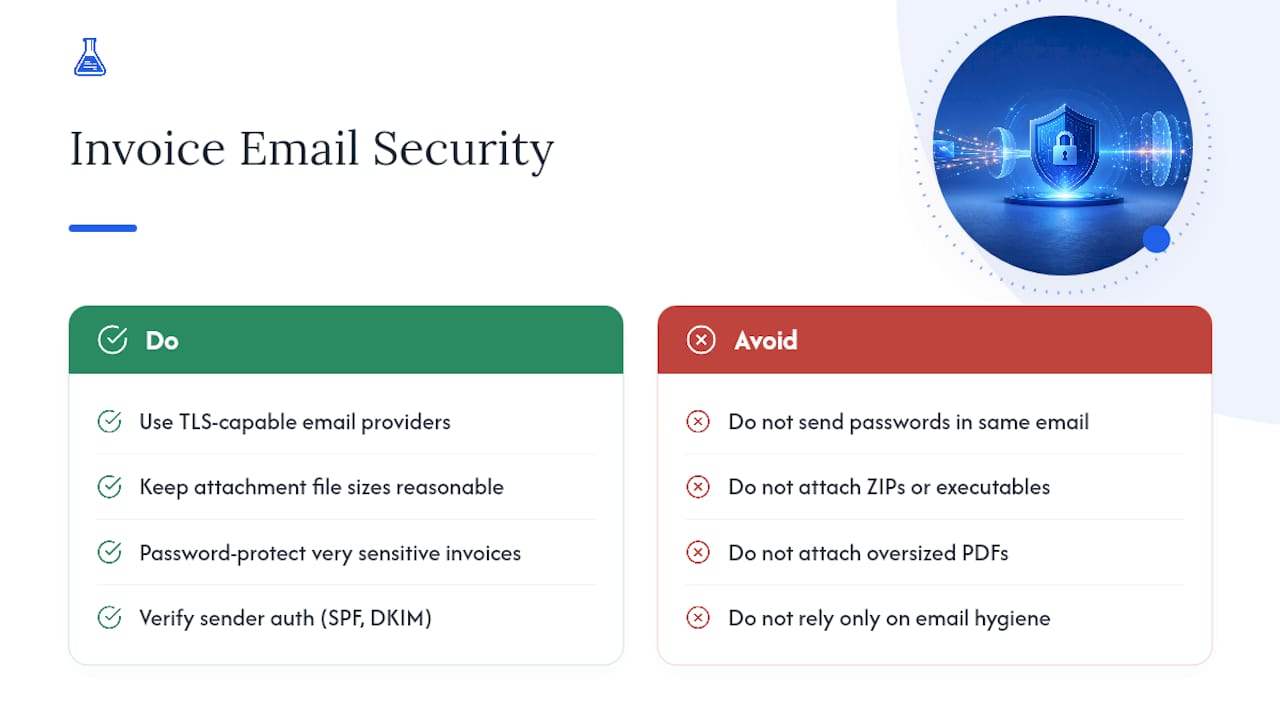
An invoice email often carries sensitive financial details: bank account numbers, client names, project values. Treat it accordingly. Adobe’s guidance on secure invoice delivery recommends sending through email providers that support TLS encryption in transit, which most major business email platforms already do by default.
Keep attachment file sizes reasonable. Oversized PDFs sometimes get bounced by corporate spam filters, which quietly kills delivery without you noticing. If a client requests password protection on invoices containing especially sensitive figures, use it and share the password through a separate channel, never in the same email.
Avoid unusual attachment formats. AP teams generally trust PDFs and are suspicious of ZIP files or executable attachments, which spam filters flag automatically. A [practical email security checklist for small businesses](https https://mavericksofficesolutions.com/email-security-for-business) covers additional steps like verifying sender authentication settings (SPF, DKIM) so your invoices don’t land in spam in the first place.
Double-check the recipient address before sending, especially when a contact name autocompletes to the wrong person in your email client. That’s an easy way for financial details to end up somewhere they shouldn’t. If your invoicing runs through software rather than manual email, look for a platform with bank-grade encryption standards built in, so you’re not relying on your own email hygiene as the only safeguard.
Why We Built InvoiceLabs Around Speed and Tracking
Every template and checklist above exists because the invoicing process itself is usually where payment gets stuck, not the client’s willingness to pay. InvoiceLabs was built to remove the friction: quick invoice creation, real-time tax calculations, and instant delivery so the email and the PDF are never out of sync. Status tracking means you know the moment an invoice is opened instead of guessing whether it landed in spam.
The goal was never to replace good judgment about tone or timing. It was to make sure the mechanical parts, formatting, calculations, delivery, tracking, never become the reason a payment runs late.
— Black Flame Digital
Send Your Next Invoice in Under a Minute
Everything in this guide works whether you write invoices by hand or use software, but software removes the room for the small errors that stall payment: mismatched totals, missing due dates, forgotten payment links. InvoiceLabs handles the formatting and math automatically, so the email you send matches the PDF every time.

Use the free quick invoice generator when you need to send a one-off invoice right now, no account required. If you bill clients regularly, a profession-specific layout from the invoice template library keeps your branding consistent every time, whether you’re a web developer, a consultant, or a personal trainer billing by session. Every invoice comes with built-in tax calculations, instant delivery, and status tracking, so you know the moment it’s been opened instead of wondering if it landed in a spam folder. Create your next invoice and send it before this coffee gets cold.
Sources
- Invoice Email Template: How to Write One (2025) - Shopify
- How to write an invoice email (with template) | Stripe
- Email invoices: How to send an invoice through email | Adobe Acrobat
- How to send an invoice step by step - Tailride
- How to write an invoice email | GoCardless
Recommended
Send your next invoice in seconds
Create professional invoices, track payments and get paid faster — free to start.


