How to Send Invoices From Phone in Under a Minute
The fastest reliable way to send an invoice from your phone is to generate a branded PDF plus a chat-friendly image or a one-tap payment link, then send both through whatever channel your client actually checks. A quick invoice tool like InvoiceLabs’ Quick Invoice can produce that PDF, calculate tax in real time, and hand you a Stripe payment link in under 30 seconds.
Which delivery channel you pick depends on the job:
- Email — best for formal records and clients who expect a traditional paper trail.
- SMS or a shareable link — fast, works for clients without WhatsApp, but feels less personal.
- WhatsApp or another chat app — gets opened almost immediately, ideal for clients you already text.
If you invoice once in a while, a mobile web generator with no login gets the job done. If you bill weekly, an app that remembers your clients and tracks payment status saves far more time over a month.
Key Takeaways
Sending invoices from a phone works best when you pair a chat-friendly image or payment link for speed with a formal PDF for recordkeeping.
| Point | Details |
|---|---|
| Match method to volume | Use a quick generator for one-off invoices and a full app once you’re billing multiple clients regularly. |
| Send two formats | Pair a chat-optimized image with a formal A4 PDF so speed and recordkeeping both get covered. |
| Add a payment link | Include a Stripe link plus bank details so clients can pay however they prefer. |
| Back up every PDF | Store a copy in cloud accounting or a secure folder immediately after sending. |
| Use InvoiceLabs for speed | InvoiceLabs’ Quick Invoice creates a branded, tax-calculated invoice with a Stripe link in under 30 seconds. |
Table of Contents
- Best Methods to Send an Invoice From Your Phone
- Step-by-Step: Creating and Sending an Invoice From Your Phone
- What to Include and How to Word Your Message
- Getting Paid: Payment Links and Status Tracking on Mobile
- Templates That Cut Your Invoicing Time to Seconds
- Keeping Mobile Invoices Secure and Audit-Ready
- What Actually Matters When You Invoice From Your Phone
- Send Your Next Invoice in Under 30 Seconds With InvoiceLabs
- Sources
Best Methods to Send an Invoice From Your Phone
Three mobile paths get an invoice out the door, and each fits a different kind of workload.
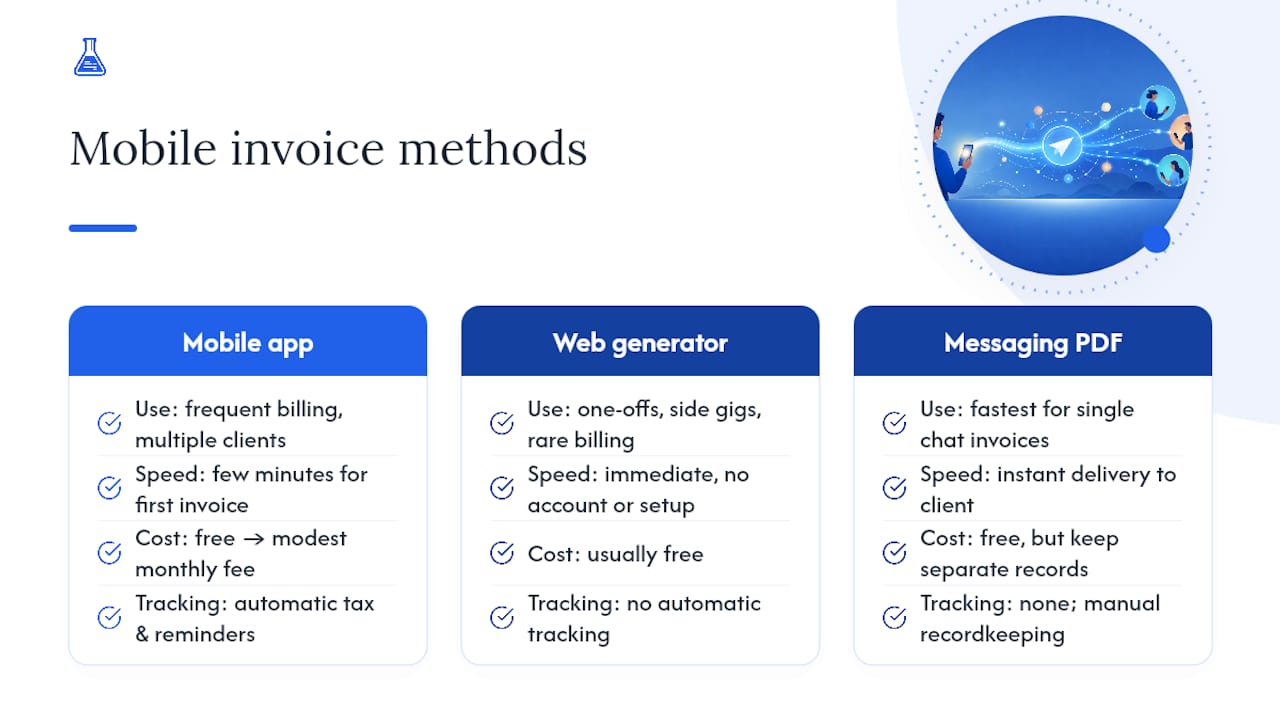
A dedicated mobile invoicing app wins if you send more than a couple of invoices a week. It remembers client details, applies your default tax rate automatically, and flags when something is overdue without you checking manually. That kind of tracking is exactly why apps designed for mobile billing on Android have become standard for freelancers juggling several active clients.

A mobile web generator or quick-invoice tool is the better call for one-off jobs, side gigs, or a single client you bill rarely. No account, no setup, just fill in the fields and export. Free quick generators exist specifically for this occasional-use case, while full apps make more sense once volume and reminders matter.
Messaging apps with a manually attached PDF are the fastest of all in terms of raw speed, since your client sees the amount the second the image lands in chat. The catch: you need a separate PDF for your own records, since a chat screenshot won’t satisfy an accountant or a tax return.
Time-to-send varies from quick generator speeds to a few minutes for a full app setup on the first invoice with a new client. Cost ranges from free, for basic one-off invoices, to a modest monthly fee once you need unlimited clients, recurring billing, or advanced tracking.
Step-by-Step: Creating and Sending an Invoice From Your Phone
Here’s the workflow that gets an invoice from blank screen to client’s inbox with the least friction:
- Set up once. Save the client’s name, address, and email. Set your default tax rate and standard payment terms (net 7, net 14, whatever you use) so you never retype them.
- Create the invoice. Fill in the line items, attach your logo if the template supports it, and double check the invoice number and due date. A wrong invoice number is the single most common reason invoices get flagged during bookkeeping.
- Export in two formats. Generate an A4 PDF for your records and accounting software, then export a chat-optimized PNG or JPG (or grab the shareable link) for instant viewing in messaging apps.
- Send through your chosen channel. Attach the image directly in WhatsApp with a short note, or paste the shareable link into an SMS or email.
- Record it immediately. Mark the invoice as sent inside your tool, then back up the PDF to cloud accounting software or a dedicated phone folder before you move on to the next task.
Pro Tip: Set your invoice numbering to auto-increment before you ever send your first mobile invoice. Manually tracking numbers across phone, laptop, and email leads to duplicates within a month, and that’s a headache no freelancer needs during tax season.
What to Include and How to Word Your Message
Every invoice, however it’s sent, needs the same core fields: your business name and details, the client’s name, an invoice number, the issue date, the due date, itemized costs, VAT where it applies, the total, and clear payment instructions. Skip any of those and you’ll get a follow-up question instead of a payment.
Sending both a chat-optimized image and a formal PDF covers speed and compliance at once. The best practice from messaging-focused invoice tools is to lead with the image, since it shows the amount the instant it lands, then follow with the PDF for the client’s own records.
For WhatsApp or SMS, keep it short: “Hi [Name], here’s your invoice for [project] — $[amount] due [date]. Pay instantly here: [link].” For email, add one more line naming the attached PDF and confirming accepted payment methods. Name your PDF files consistently, something like ClientName_InvoiceNumber_Date.pdf, so a quick phone search finds any invoice in seconds.
Getting Paid: Payment Links and Status Tracking on Mobile
A payment link changes how fast you get paid. Invoices with a one-tap link get settled noticeably faster than invoices that only list bank details, simply because the client can pay without leaving the chat.
Cover both bases on every invoice:
- A direct Stripe payment link for clients who want to pay by card on the spot.
- Full bank transfer details (sort code, account number, reference) for clients who prefer that route.
- A clear note on processing fees, if any apply to the card option.
Most mobile invoicing tools flag status automatically, showing whether an invoice has been viewed, sent, or paid, so you’re not guessing. Set automatic reminders where your tool allows it, and if you’re following up manually, the same guidance that works for chat invoicing applies here too: send a gentle nudge two days before the due date, in the same thread you sent the original invoice. For clients who consistently pay late, a resource like this receivables management guide covers escalation steps worth having on hand.
Templates That Cut Your Invoicing Time to Seconds
A saved template turns a two-minute task into a fifteen-second one. Build yours with your logo, default VAT rate, standard payment terms, and any line items you bill repeatedly, whether that’s an hourly consulting rate or a fixed project fee.
Client presets go a step further. Once a client’s address, preferred payment method, and reminder schedule are saved, creating their next invoice is mostly just changing the amount and hitting send.
- Use a saved template for any client you bill more than once.
- Use a one-off generator for single jobs, new clients, or side work you don’t expect to repeat.
- Keep profession-specific templates on hand if your invoices need different fields (materials for tradespeople, hours for consultants, deliverables for creatives).
Keeping Mobile Invoices Secure and Audit-Ready
Speed doesn’t have to cost you security or a clean paper trail. A few habits keep mobile invoicing safe and defensible at tax time:
- Only use invoicing sites and apps with HTTPS, and turn on two-factor authentication for any account tied to client payment data.
- Keep a PDF backup of every invoice in cloud accounting software or a dedicated secure folder. Automating that backup cuts down on missing records when errors happen.
- Photograph and attach receipts to related invoices right away, and tag each payment as it clears.
- Run a monthly check: are your VAT figures logged, invoices numbered sequentially, and PDFs actually backed up? A five-minute mobile review beats a scramble in April.
What Actually Matters When You Invoice From Your Phone
Most advice on mobile invoicing focuses on speed alone, and that’s half the picture. Getting an invoice out in 30 seconds means nothing if the file disappears into a chat thread and never makes it into your books. The real skill here is running two habits at once: sending fast enough that the client pays before they forget the job, and filing thoroughly enough that you’re not reconstructing six months of invoices from memory in March.
Where conventional advice falls short is treating chat delivery and formal recordkeeping as competing priorities. They’re not. A chat image gets you seen; a PDF gets you paid correctly and keeps your books clean. Skip either one and you’re trading a short-term convenience for a long-term problem, usually right around tax season.
If you invoice more than once a month, prioritize the setup work first: saved client details, a default tax rate, and a template. That upfront effort is what turns “fast” into “fast every single time,” rather than fast only when you remember all the fields.
— Black Flame Digital
Send Your Next Invoice in Under 30 Seconds With InvoiceLabs
InvoiceLabs is built for exactly the workflow this guide describes: create the invoice, get paid faster, without opening a laptop. The Quick Invoice tool generates a professional invoice in under 30 seconds, applies real-time tax calculations automatically, and gives your client a Stripe payment link the moment it’s sent.

Every invoice tracks its own status, so you know the instant it’s viewed or paid, without chasing anyone for confirmation. Bank-grade security protects client data on every plan, and there are no hidden fees buried in the fine print. If your work fits a specific profession, browse ready-made invoice templates for consultants or graphic designers to save even more setup time on repeat clients. Try the free generator on your next invoice and see how fast “sent” turns into “paid.”
Sources
- Free WhatsApp Invoice Generator: Create and Send Invoices on WhatsApp
- Automate billing and invoicing: cut costs and errors
Recommended
Send your next invoice in seconds
Create professional invoices, track payments and get paid faster — free to start.


